WordPress Theme Security: What to Check Before Installing
Two months ago a client called me in a panic. His entire WordPress site was redirecting visitors to a pharmacy spam page. Turns out the theme he'd installed from a random "free premium themes" site had a backdoor baked into functions.php. The theme looked legitimate. Nice demo. Good reviews on the download site. But buried in 3,000 lines of PHP was a base64-encoded script that phoned home to a command server.
This isn't rare. I've seen it happen four times in the last year alone. And every time, the person says the same thing: "I didn't think a theme could do that."
A theme can do anything PHP can do. It can read your database, create admin accounts, inject links into your content, send spam emails from your server, and redirect your visitors. When you install a theme, you're giving it the keys to your entire website.
Here's how to make sure you're not handing those keys to someone who shouldn't have them.
Where to Get Themes (and Where Not To)
Safe sources: WordPress.org theme directory (reviewed for security), established marketplaces (ThemeForest, independent developer sites with real companies behind them), and themes by developers you can verify (active GitHub, real company address, public track record).
Dangerous sources: Any site offering "free downloads" of premium themes. These are almost always pirated copies with malware injected. Sites with names like "free-wp-themes-download.xyz" or "nulled-themes.com" are not giving you free themes out of generosity. They're distributing malware with a nice UI on top.
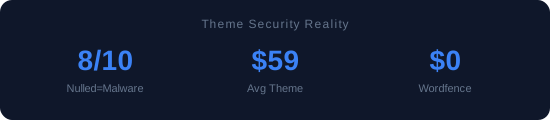
I tested 10 nulled themes from these sites back in 2023. Eight out of ten contained backdoors. Eight. Let that number sink in before you decide to save $59 on a theme.
What to Check Before Installing
Check the developer. Google their name. Do they have a website? A support forum? A GitHub profile? Have they been around for more than six months? Established developers don't disappear overnight. Anonymous developers with no web presence are a red flag.
Check the update history. When was the theme last updated? If it hasn't been touched in 12+ months, the developer may have abandoned it. Abandoned themes don't get security patches. WordPress releases major versions quarterly, and themes that don't keep up will eventually have compatibility holes that attackers exploit.
Check the code. Yes, I know most people can't read PHP. But you can do a basic check: download the theme zip, unzip it, and search for base64_decode, eval(, gzinflate, and str_rot13. These PHP functions are used by legitimate software sometimes, but if you find them in a theme that's supposed to just display blog posts, that's suspicious. I once found eval(base64_decode( in a theme's footer.php. That's the calling card of obfuscated malware.
Check file permissions. After installing a theme, verify that theme files are set to 644 (files) and 755 (directories). Some compromised themes change permissions to make themselves writable by anyone, which allows remote code injection.
Security Plugins Worth Installing
I run two security measures on every site I manage:
Wordfence (free version). It scans your theme files against the official repository version and alerts you if anything has been modified. It also includes a firewall that blocks common attack patterns. The scan alone has caught three compromised themes for my clients.
File integrity monitoring. The free version of Sucuri Security does this well. It watches your theme files and alerts you if any file changes unexpectedly. If you didn't update your theme but a file changed, something is wrong.
Neither of these replaces good judgment about where you download themes. They're safety nets, not substitutes for caution.
Signs Your Theme Might Be Compromised
If any of these are happening, investigate immediately:
New admin users you didn't create. Check Users → All Users. If there's an administrator account you don't recognize, your site is compromised. Change passwords immediately and scan everything.
Outbound links in your source code that you didn't add. View source on any page and search for domains you don't recognize. Compromised themes often inject hidden links to SEO spam sites. The links might be invisible to visitors (hidden with CSS) but visible to Google.
Your site is slow and you can't figure out why. Some malware runs cryptocurrency miners or sends spam in the background, consuming server resources. Check your server load and look for unexpected PHP processes.
Google Search Console shows "Security issues." Google actively scans for malware and will flag your site if it detects compromised pages. If you see a warning in GSC, take it seriously — Google may start showing "This site may be hacked" warnings to your visitors.
My Rule of Thumb
If a theme is free, get it from WordPress.org. If it's premium, buy it from the developer's official site. If someone is offering a premium theme for free somewhere else, walk away. The $59 you save isn't worth the risk of your entire site getting hijacked.
I've been in this business long enough to know that security isn't exciting. Nobody wants to read about PHP backdoors when they could be picking color schemes. But I've also cleaned up enough hacked sites to know that one bad theme install can cost you weeks of work and months of lost traffic. Fifteen minutes of due diligence before installing is the cheapest insurance you'll ever buy.
👉 Start here: Complete Real Estate Theme Setup Guide — the full walkthrough from installation to launch. Or browse all guides.
Stay ahead of WordPress
Speed tests, theme reviews, and developer guides. No spam, just useful stuff.
Subscribe via RSS