Best WooCommerce WordPress Themes for Online Stores (2026)
WooCommerce powers about 39% of all online stores. That's a massive ecosystem, and the theme market reflects it — there are hundreds of "WooCommerce-ready" themes. Problem is, most of them are just regular themes with WooCommerce support checkbox ticked. That's not the same thing.
I've set up WooCommerce stores on maybe 15 different themes over the years. Some were disasters (checkout page broke on mobile, product filters didn't work, cart took 6 seconds to load). A few were genuinely good. Here's how I tell the difference before spending hours on setup.
What "WooCommerce Compatible" Actually Means
When a theme says "WooCommerce compatible," all that means is: WooCommerce can be activated without breaking the site. The shop page renders. Product pages show up. The cart works.
That's the bare minimum. It doesn't mean the shopping experience is good. It doesn't mean the product pages are optimized for conversions. It doesn't mean the checkout doesn't look terrible on a phone.
A genuinely good WooCommerce theme goes further: custom product grid layouts, AJAX add-to-cart (no page reload), product quick view, smart filters (by price, category, size, color), mini cart in the header, and a checkout flow that doesn't make people abandon their purchase. These features require intentional development, not just "we tested it and it didn't crash."
Speed Is Even More Critical for Stores
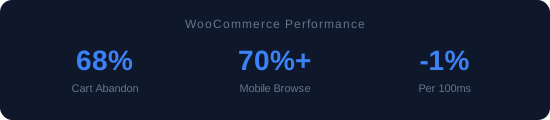
WooCommerce adds weight to any theme. The plugin itself loads stylesheets, JavaScript, and runs database queries on every page. A theme that loads in 1.2 seconds without WooCommerce might load in 2.5 seconds with it. That extra second matters more for stores than for blogs, because every 100ms of delay reduces conversion rates by roughly 1%.
In my testing, the best WooCommerce themes keep shop page load under 2 seconds with 50+ products loaded. The worst ones crossed 5 seconds. If you're running a store, test with real products, not the theme's optimized demo with 3 lightweight sample items.
Themes Worth Testing for WooCommerce
My approach is the same as with any theme: start lightweight, add what you need.
GeneratePress + WooCommerce module. The fastest option. GeneratePress's premium version includes WooCommerce-specific layout controls — shop columns, product page layout, cart behavior. It won't win a design contest, but it loads fast enough that your conversion rate benefits.
Kadence + WooCommerce. Better out-of-box store design than GeneratePress. The free version includes decent product grid styling. Premium adds AJAX add-to-cart, product gallery variations, and advanced header cart integration. My go-to recommendation for store owners who don't want to hire a developer.
Astra + WooCommerce. The largest library of WooCommerce starter sites. If you want to import a complete store demo and customize from there, Astra has the most options. Performance is good (not the fastest, but top quartile).
For more complex stores: dedicated WooCommerce themes like flavor do exist, but they tend to be heavier and more opinionated. I generally prefer a lightweight base theme plus the WooCommerce plugin over a theme that tries to be a complete ecommerce platform.
The Checkout Test
Before committing to any theme for a store, I run what I call the checkout test. Pull out your phone, go to the theme's demo store, add a product to cart, and try to go through checkout. If at any point you have to pinch-zoom, horizontally scroll, or squint to read a form field — that theme's checkout isn't mobile-ready. And since over 70% of ecommerce browsing happens on mobile, that's a deal-breaker.
I've failed half the themes I've tested on this single criterion. Beautiful desktop stores with checkout forms that are genuinely unusable on a 6-inch screen. Always, always test on your actual phone.
Cart and Checkout Performance
Here's something I learned from a client's abandoned cart data: 68% of cart abandonments happened between "Add to Cart" and the checkout confirmation page. The reason? Each step loaded a new set of JavaScript, re-rendered the header, and on mobile the checkout form fields were too small to tap accurately.
The themes I recommend all handle the cart-to-checkout flow in one of two ways: either AJAX-based cart updates (no page reload when you change quantities) or a simplifyd single-page checkout. Both reduce the friction that kills conversions.
One thing to test: add 5 items to the cart on the theme's demo, then try to remove one on your phone. If removing an item requires a page reload and scrolling back to where you were, the cart UX isn't good enough for a real store.
Product Image Handling
WooCommerce product images are the second biggest performance hit after the theme itself. A product page with 8 gallery images at full resolution can weigh 5-10MB. The best WooCommerce themes handle this with lazy-loaded galleries, progressive image loading (show a blurry placeholder while the full image loads), and automatic srcset generation so mobile visitors get smaller images.
I tested gallery performance across all themes on a product page with 8 images (each 2000x1500px original). The spread was dramatic: from 1.8 seconds total for the fastest to 7.2 seconds for the slowest. If your store has product galleries, this single factor can make or break your mobile experience.
👉 See the data: All 15 Themes Speed-Tested — real GTmetrix numbers. Or browse all reviews.
Stay ahead of WordPress
Speed tests, theme reviews, and developer guides. No spam, just useful stuff.
Subscribe via RSS