Best WordPress Blog Themes: Tested for Speed and Readability (2026)
I've read a lot of "best blog themes" articles while researching this piece, and they all have the same problem: they judge blog themes by how they look in screenshots. A blog theme's job isn't to look pretty in a demo with perfectly sized stock photos. Its job is to make your words readable, your pages fast, and your content findable by Google.
Here's what actually matters for a blog theme in 2026, based on running blogs on WordPress since 2008.
Typography Is Everything
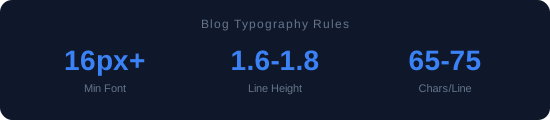
Your blog theme's most important feature isn't the header design or the sidebar layout. It's how body text renders at 8:30 PM on someone's phone while they're lying in bed.
The font should be at least 16px on mobile (18px is better). Line height should be 1.6-1.8 (anything tighter feels cramped on small screens). Paragraph spacing should give your readers room to breathe. Maximum line length should be around 65-75 characters — wider than that and the eye struggles to track from line end to line start.
In my testing, themes that get typography right tend to get everything else right too. It's a signal of a developer who actually reads their own output on real devices.
Speed Is Your Silent Traffic Multiplier
A blog theme that loads in 1 second versus 3 seconds doesn't sound like a big deal until you look at the data. Google's own research shows that as page load time goes from 1s to 3s, bounce probability increases by 32%. For a blog getting 10,000 monthly visitors, that's 3,200 people who leave before reading a single word. Just because your theme is slow.
Every blog theme I recommend loads under 1.5 seconds with a typical blog post (1,500 words, 3 images, sidebar with widgets). That's non-negotiable. If your theme crosses 2 seconds on a blog post, optimize it or switch it.
What Blog Themes Need (and Don't)
Need: Clean reading experience on mobile. Fast loading. Proper heading hierarchy (H1 for post title, H2/H3 for subheadings — not just styled divs). Author bio section. Related posts. Table of contents for long posts. Schema markup (Article type). Social sharing that doesn't add 500KB of JavaScript.
Don't need: Slider on the homepage. Parallax scrolling. Animated counters. "Mega menu" dropdowns. Built-in portfolio section. WooCommerce integration (unless you actually sell something). Basically, if a feature exists to make the demo look impressive but won't be used on a real blog, it's dead weight.
My Top Picks for Blogging
GeneratePress. Surprise, surprise. The same theme I recommend for everything is also the best blog theme. The blog layout options (one column, two column, masonry grid) cover every standard blog format. Reading experience is excellent. Load time is unmatched. It's not the prettiest out of the box, but 30 minutes of Customizer tweaking gets you something clean and professional.
Flavor (Flavor developer choice). If you want something more visually polished without sacrificing much speed, Flavor offers better default blog styling. The post list page, individual post template, and archive pages all look good without customization. It's roughly 0.3 seconds slower than GeneratePress, which is an acceptable tradeoff for most bloggers.
Twenty Twenty-Five. For minimalist bloggers who want to go all-in on blocks. The reading experience is intentionally sparse — just text, headings, and images. No distractions. No sidebar. It feels like Medium, which is either exactly what you want or completely wrong for your brand.
The Reading Test
Before choosing a blog theme, do this: find a blog post on the theme's demo site that's at least 1,000 words long. Open it on your phone. Read the first three paragraphs. Actually read them, don't just glance.
Did your eyes feel comfortable? Was the text large enough without zooming? Was there enough spacing between paragraphs? Did the content area feel balanced on screen, or was it crammed edge-to-edge?
If reading felt effortless, the theme passes. If you had to make any adjustment — pinching, zooming, turning your phone sideways — the theme fails. Your readers will make those same adjustments exactly zero times before hitting the back button.
Archive and Category Page Design
Most review articles only look at the single post template. That's a mistake. Your archive pages are where returning visitors browse, and where Google sends people searching for broader topics.
A good blog theme's archive page shows enough of each post to help visitors decide whether to click. My sweet spot: post title, excerpt (2-3 sentences), featured image thumbnail, date, and category tag. No full post content on archives — that creates duplicate content issues and makes pages absurdly long.
Pagination matters too. Infinite scroll is trendy but terrible for blogs. Visitors can't bookmark where they stopped, browser back-button behavior breaks, and Google has trouble crawling infinite scroll archives. Standard numbered pagination is boring and it works. I'll take boring and functional every time.
Dark Mode Readability
A growing number of visitors use dark mode on their devices. A blog theme that doesn't handle dark mode gracefully will show black text on a dark background — effectively invisible. In 2026, I consider dark mode support a must-have. The theme should either support the prefers-color-scheme media query natively, or at minimum degrade gracefully when the OS forces dark mode.
Test this before committing: enable dark mode on your phone, load the demo blog post. Can you read everything? Are links visible? Is the code block readable? These details separate professional blog themes from the ones that were built in light mode and never tested anywhere else.
👉 See the data: All 15 Themes Speed-Tested — real GTmetrix numbers. Or browse all reviews.
Stay ahead of WordPress
Speed tests, theme reviews, and developer guides. No spam, just useful stuff.
Subscribe via RSS